


Business Strategy & Growth

September 8, 2026

9 min read
Every CTO eventually inherits the same conversation. Someone on the leadership team — often you — looks at a system that has quietly run the business for a decade and says: "It's time to modernize this."
The instinct is understandable. The legacy platform is expensive to maintain. It's brittle. Every integration takes longer than it should. Reporting requires three people and a spreadsheet nobody fully trusts. And so the conversation jumps almost immediately to solutions: rewrite it, move it to the cloud, break it into microservices, replace the platform outright.
Here's the uncomfortable part: that instinct is often wrong — not because modernization is a bad idea, but because of the order in which it happens. Most modernization programmes start with a technology decision. The right ones start with a legacy modernization risk assessment.
Modernization doesn't automatically reduce risk. Done in the wrong order, it multiplies it.
Not every old system is a liability. Plenty of ageing platforms still do their job quietly and well. Legacy technology becomes a genuine business problem the moment maintaining the status quo starts limiting what the company can actually do.
That shows up in a handful of recognisable patterns:
If you recognise two or three of these, modernization is probably the right conversation. But it's still the wrong place to start — that starts with a technical debt assessment, not a technology choice.
Somewhere along the way, "modernize" became shorthand for "rewrite." It shouldn't be. A company facing legacy risk has considerably more than one lever to pull:
The right choice depends on business risk, dependencies, urgency, cost, and operational tolerance — not on which architecture happens to be fashionable this year. Yet in our experience working with Benelux and UK enterprises, the technology decision is usually made before the risk assessment even starts. That's backwards, and it's expensive. Legacy code modernization done this way tends to solve the wrong problem faster.
Before committing to a modernization path, it's worth reviewing the system across seven distinct risk areas. Think of this as due diligence — the same rigour you'd expect before an acquisition, applied to your own technology estate.
Which critical processes depend on this system? Which teams touch it every single day? What operations simply cannot stop? What happens if it's unavailable for a few hours — or a few days? Are there seasonal or operational periods (year-end close, peak trading season, audit windows) when migration would be especially dangerous?
A technically flawless migration can still be a failure if it disrupts operations the business can't afford to pause.
Which internal applications connect to this system? Which third parties depend on it? Are the integrations even documented, or are they a patchwork of old APIs, batch jobs, scripts, and manual data transfers built up over years? What breaks downstream if one component changes?
Legacy systems almost always have more dependencies than the team initially assumes. Map the dependency chain before you touch the architecture — not after.
What data actually needs to move? Is historical data still required, or just assumed to be? Are formats consistent across sources? Are records duplicated, incomplete, or simply wrong in ways nobody has had to confront yet? Who actually owns the data? How will migration accuracy be validated, and will both systems need simultaneous access during the transition?
Here's the trap: the application can migrate successfully while the business still loses trust in it, because the data underneath is incomplete or inconsistent — the same gap that can quietly turn an AI initiative into a data risk before a single model is even trained. A proper data migration risk assessment catches this before go-live, not after.
Is the system properly documented — realistically? Which business rules exist only in the code, with no record anywhere else? Are there undocumented exceptions built up from years of edge cases? Who still understands the historical decisions behind how the system behaves? What disappears the day a specific person leaves?
The legacy codebase isn't just old technology. It's years of business decisions, encoded in a language most of the organisation can no longer read. Legacy code modernization that skips this step can silently remove functionality nobody realised was load-bearing.
Review unsupported technologies, outdated dependencies, access controls, authentication methods, sensitive data handling, audit requirements, regulatory constraints, and third-party dependencies.
The nuance that's easy to miss: modernization itself introduces new security risk during the transition, particularly when old and new environments have to coexist for weeks or months. A migration plan that ignores this is a plan with a gap in it.
Big-bang cutover, or phased rollout? Can old and new systems genuinely run in parallel? How will data stay synchronised between them? What does rollback actually look like if something goes wrong — not in theory, but in practice? How do users move across? How do you test under real operational conditions rather than a clean staging environment?
Most teams plan the destination architecture with real care. Far fewer plan the journey to get there with the same discipline. The transition architecture can be just as important as the target architecture — and it's usually where projects actually fail.
Is the full rewrite genuinely necessary, or has it become the default answer? Which components create the greatest risk if left untouched? What could be modernized independently, without waiting for a single monolithic programme? What assumptions is the estimate actually built on? What happens if the project runs 30–50% longer than planned — which, statistically, is closer to the norm than the exception?
Large modernization programmes become dangerous the moment scope expands faster than business value. This is where progressive modernization earns its keep: prioritise the highest-risk or highest-value components first, rather than attempting to modernize everything simultaneously. A technical debt assessment at this stage tells you exactly where that priority order should start.
If you're wondering specifically how to plan a legacy system migration rather than a full rebuild, the sequence generally looks like this:
There's no universal answer, but there is a useful starting framework:
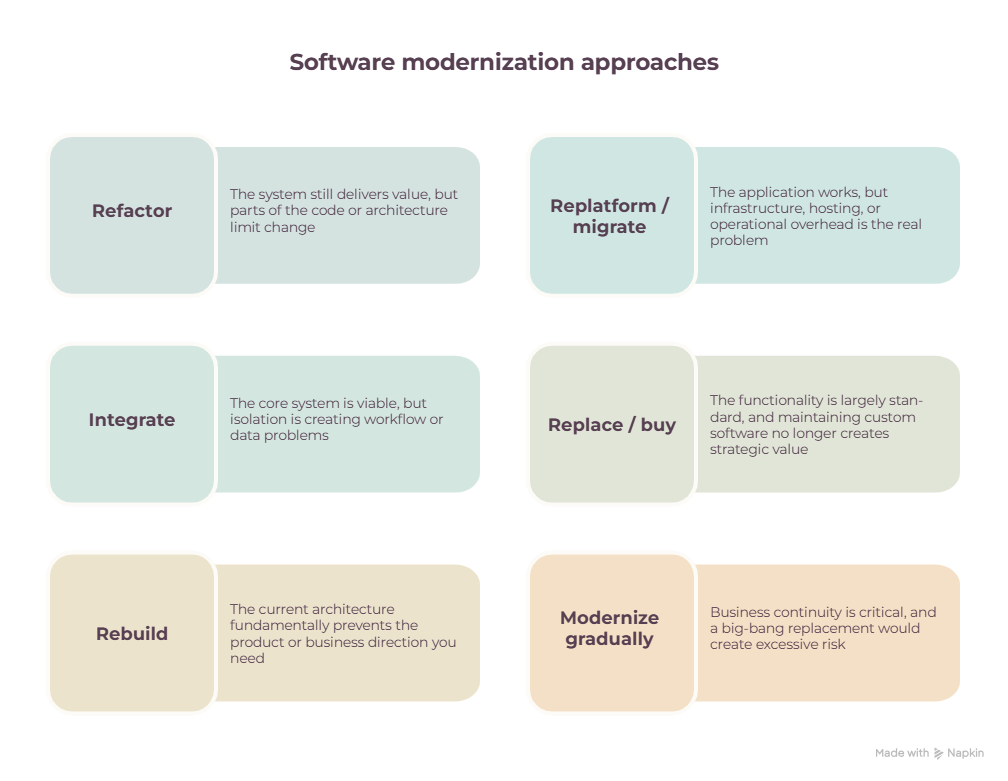
None of these are rigid rules. The point is that "rebuild" is one option among several — not the default.
Full rewrites are seductive for good reason. They promise clean architecture, the removal of technical debt in one motion, modern technology across the board, and simpler development from day one.
They also tend to come with long delivery cycles, requirements that shift halfway through, quietly lost business logic nobody remembers to re-specify, real migration complexity, delayed ROI, and the burden of maintaining two systems in parallel for far longer than anyone budgeted for.
A complete rewrite can absolutely be the right call. But it should be a conclusion you arrive at after the risk assessment — not the assumption you walk in with.
Done well, a legacy modernization risk assessment gives leadership clarity on six things:
Before approving a modernization programme, confirm:
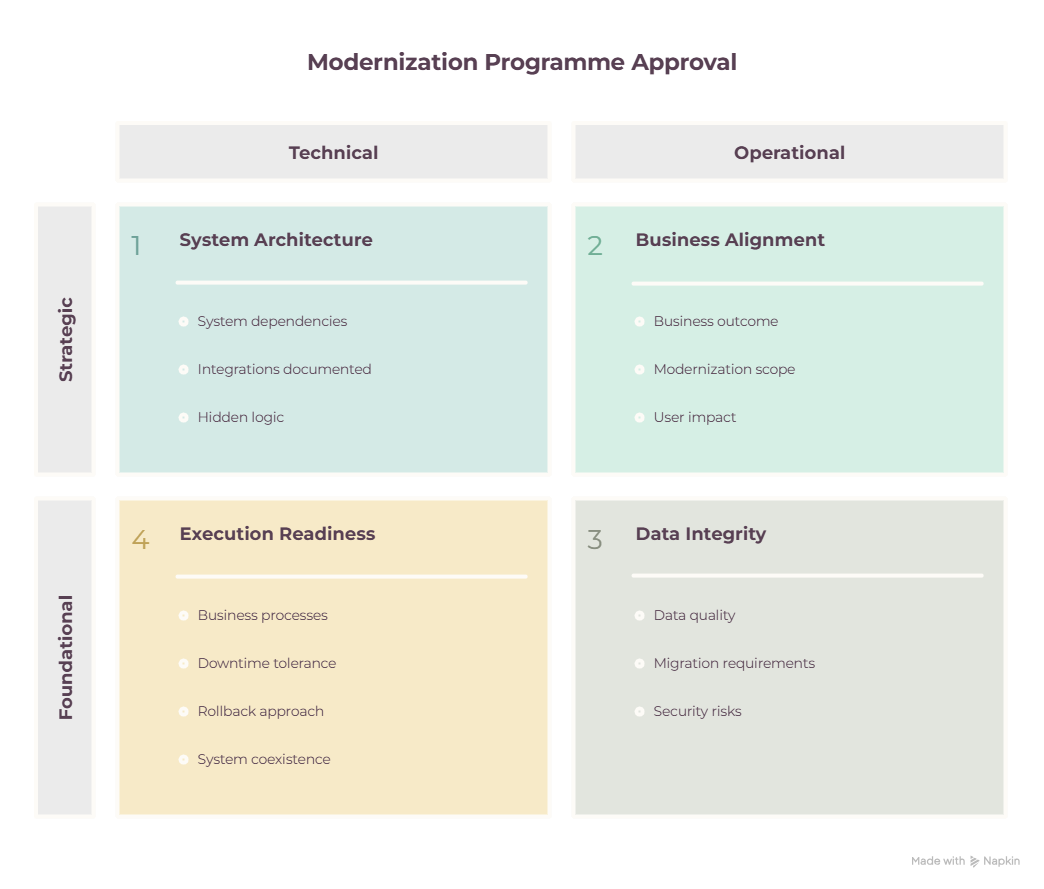
A few unchecked boxes don't mean "don't modernize." They mean those uncertainties need to be resolved before you commit to a delivery approach — not discovered halfway through one.
Legacy modernization shouldn't begin with a preference for the cloud, for microservices, for a new framework, or for a full rewrite. It should begin with three questions: What is creating risk today? What could create risk during the transition? And what should change first — versus what can safely remain exactly as it is?
The goal was never to modernize as much as possible. The goal is to reduce the right risks, protect business continuity, and build a technology foundation that actually supports where the business needs to go next.
Not sure where your biggest modernization risks actually sit? Sigli offers a free Pre-Build Risk Review to help CTOs and technology leaders map dependencies, data risks, and transition complexity before committing to a delivery approach.
A legacy modernization risk assessment is a structured review of business continuity, dependencies, data quality, undocumented logic, security, transition complexity, and delivery scope — done before choosing whether to rebuild, migrate, replace, or refactor a system.
A technical debt assessment focuses specifically on code quality, architecture limitations, and the cost of continuing to build on the current system. It typically feeds into risk area 7 (delivery scope, cost, and timeline) of the broader legacy modernization risk assessment.
A data migration risk assessment looks at data completeness, quality, ownership, format consistency, and validation methods — separately from the application migration — since data trust issues are one of the most common causes of "successful" migrations that still fail in practice.
Start with the risk assessment, map dependencies, treat data migration as its own workstream, choose a transition model (phased vs. big-bang), define rollback criteria, and sequence components by risk and business value rather than migrating everything at once.



.svg)
.svg)
.svg)
.svg)


.svg)

.svg)
.svg)
.svg)
.svg)
.svg)
.webp)


.webp)


