Extranet Lockdown for small hotels and B&Bs

Keep scammers out of your Booking.com account

Hijacked accounts are used to ask your guests for money. The refunds and bad reviews land on you. We lock it down in one session.
Fixed price €490 excl. VAT  ·  Remote session, about 2–3 hours  ·  No technical knowledge needed
Free and no obligation. Run by Sigli's ISO/IEC 27001:2022-certified security team.
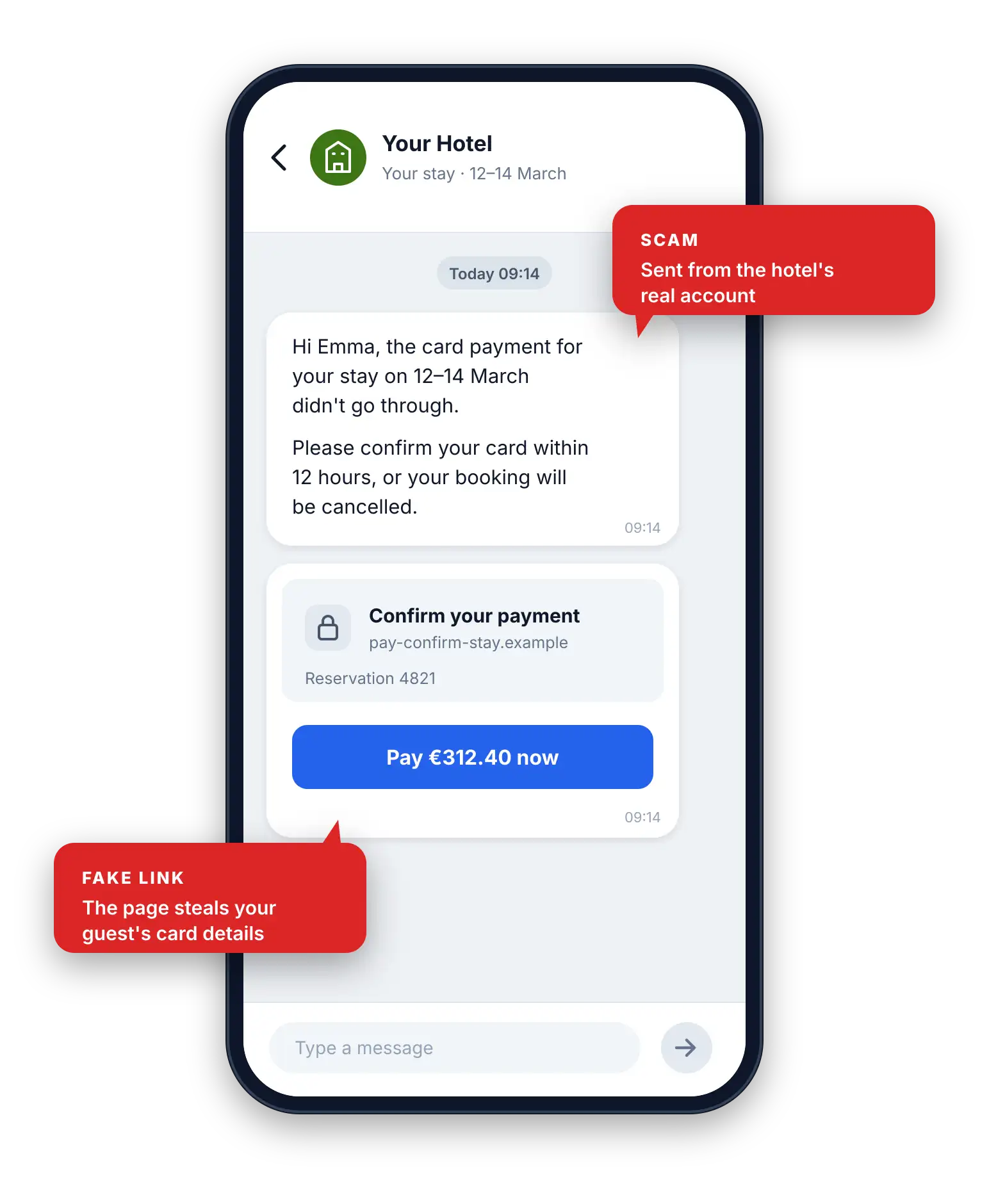
Example of a fake payment request sent to a hotel guest from a hijacked booking account
Already hacked, or a guest got a strange payment request? Don't wait for a call slot. Call or WhatsApp us on +37060522384 or email info@sigli.com today.

How the Booking.com scam works

01

One email to the front desk is all it takes

A fake guest complaint or "verify your account" notice looks routine. One click can install software that quietly steals your passwords.

02

Scammers message your guests from your own listing

They use real names and dates, so guests trust the payment link. The angry review, the refund request and the cost all come back to you.

03

Two-step login alone won't stop them

Fake login pages capture the code as you type it. If your inbox or computer is exposed, the door stays open.

Why this matters now

2026

Booking.com confirmed that partner staff were phished into giving away account access

350

hijacked properties found in 50 countries, a quarter of them B&Bs and rentals

You pay

Booking.com can reclaim the guests' losses from the property

Free self-check

Is your Booking.com account exposed?

Five yes-or-no questions, about two minutes. If you answer "no" to any of them, your account may be easier to take over than you think.

1. Does everyone who uses your Booking.com extranet have their own personal login?
2. Is two-step verification turned on for every one of those logins?
3. Does your team always open the extranet from a bookmark or by typing the address, never from a link in an email?
4. Is the email address linked to your Booking.com account protected with two-step verification too?
5. Has anyone checked the front-desk computer for unwanted software in the last six months?

Answered "no" to one or more? Those are the gaps scammers use. Book a free call and we'll show you what to fix first.

Book a free 30-minute call
Thank you! Your submission has been received!
Oops! Something went wrong while submitting the form.

How Extranet Lockdown works

Step 1

Lock down your Booking.com login

Every user gets their own secure login with a second check, old accounts are removed, and your bank details are confirmed as yours.

Step 2

Secure your email and computer

We protect the inbox that resets every other password, check for hidden forwarding, and remove any password-stealing software from the front-desk computer.

Step 3

Brief your team in 30 minutes

Real examples of fake Booking.com emails, plus the one rule that stops most attacks: never log in through a link in an email.

Step 4

Be ready if it happens

You get a warning line for guest confirmations and your website, a one-page "if it happens" plan, and a written summary of everything we did.

How we work safely

You're letting us look at the accounts scammers are after, so here's exactly how we handle them.

  • We never ask for your passwords. You type every password yourself while we guide you over a screen share.
  • You stay in control. You see everything we do on your screen and can stop the session at any moment.
  • A certified security team. Sigli is an ISO/IEC 27001:2022-certified software and IT consulting company, founded in 2015, with more than 90 people across Vilnius, Antwerp and London.
Price

One fixed price, no subscription

You know the full cost before we start. The first 30-minute call is free, and you only pay if you decide to go ahead.

Extranet Lockdown
€490
excl. VAT, one property
  • Secure logins for up to 3 Booking.com users
  • Inbox protection and one front-desk computer checked
  • 30-minute team briefing
  • Written summary and one-page "if it happens" plan
Extra computer or user: €60 each.
Book a free 30-minute call

Built for small properties that sell through Booking.com

Hotels

Small and independent hotels without an in-house IT team.

B&Bs and guesthouses

Owner-run places where one computer handles bookings and email.

Apartment rentals

Holiday apartments run by owners or small management teams.

Campsites

Campsites that rent pitches and lodges through Booking.com.

Frequently asked questions

Doesn't Booking.com already protect my account?

Only partly. Booking.com secures its own systems, but it says the weak point is usually the partner's side: your login, your inbox and your computer. That part is up to you, and it's what we secure.

I already use two-step login. Isn't that enough?

It helps, but it isn't enough on its own. Fake login pages can capture the code as you type it, and if your email or computer is compromised, scammers can get back in. We secure all three.

My Booking.com account was hacked. What should I do?

Contact Booking.com partner support straight away, using the contact details inside your extranet, never ones from an email. Change your extranet and email passwords from a device you trust, and warn guests with upcoming stays not to pay through links. Then call us on +37060522384: we'll help you lock everything down so it doesn't happen again.

Will you need my passwords or full access to my computer?

No. We work with you over a screen share and you type every password yourself. You see everything we do and can stop at any time.

How much does it cost?

A one-time fixed price of €490 excl. VAT for one property, covering up to 3 users and one front-desk computer. Extra computers or users are €60 each. The first 30-minute call is free.

How long does it take?

One session of about 2 to 3 hours, plus a 30-minute briefing for your team. We book it at a quiet time for your front desk.

Do I need any technical knowledge?

No. We handle the setup and explain each step in plain language.

What happens after the setup?

You keep a written summary of what we did, a one-page plan for what to do if something goes wrong, and a warning line for your guests. There's no subscription. If you'd like ongoing help later, just ask.

‍

Book your free 30-minute call

What happens next?
  1. Pick a time that's quiet for your front desk
  2. On the call, we look at how your team uses Booking.com and email, and point out the gaps.
  3. If you want to go ahead, you pick a date for the session. No obligation.

Prefer we contact you?

Leave your details and we'll get back to you within 1 working day.

Thank you! Your submission has been received!
Oops! Something went wrong while submitting the form.