AI Deveopment

November 24, 2026

11 min read
Somewhere in your company, someone has probably built a tool this month without asking IT. Maybe it's a script that pulls invoices into a spreadsheet, a dashboard pieced together over a weekend, or an AI agent that drafts customer replies from your CRM. It took hours, not months, and it works.
This is the new normal. Is there an AI that can build software? For small, focused tools, the answer is now yes. AI agents have made building small, custom tools cheap enough that the people who need them can make them themselves. That's good news. But it raises a question most companies haven't asked yet: what are all these tools standing on?
The tools are becoming disposable. The systems underneath them are not. And the quality of those systems will decide whether your team's AI-built tools save time or create chaos.
For decades, internal software was expensive to build, so it was built to last. You bought a product or commissioned a custom system, then maintained it for years, because replacing it cost too much.
AI agents change that maths. When a domain expert can describe what they need and have a working tool the same afternoon, maintaining an old tool often costs more than building a new one. Requirements change, the systems around the tool change, and rebuilding becomes the cheaper option.
Fractional CTO Ákos Maróy described this well on the Innoadvantage podcast. He calls it "the age of the throwaway mini solutions." His example is an architecture studio that builds its own small tools for one building project. When the next project comes, with different needs and different systems to connect to, it doesn't update the old tool. It writes a new one. In his words, you are never going to maintain it; you just write a new one in six months.
But Ákos adds a condition that's easy to miss. This only works on top of strong, reliable foundations. Without them, disposable tools don't make you faster. They just multiply the mess.
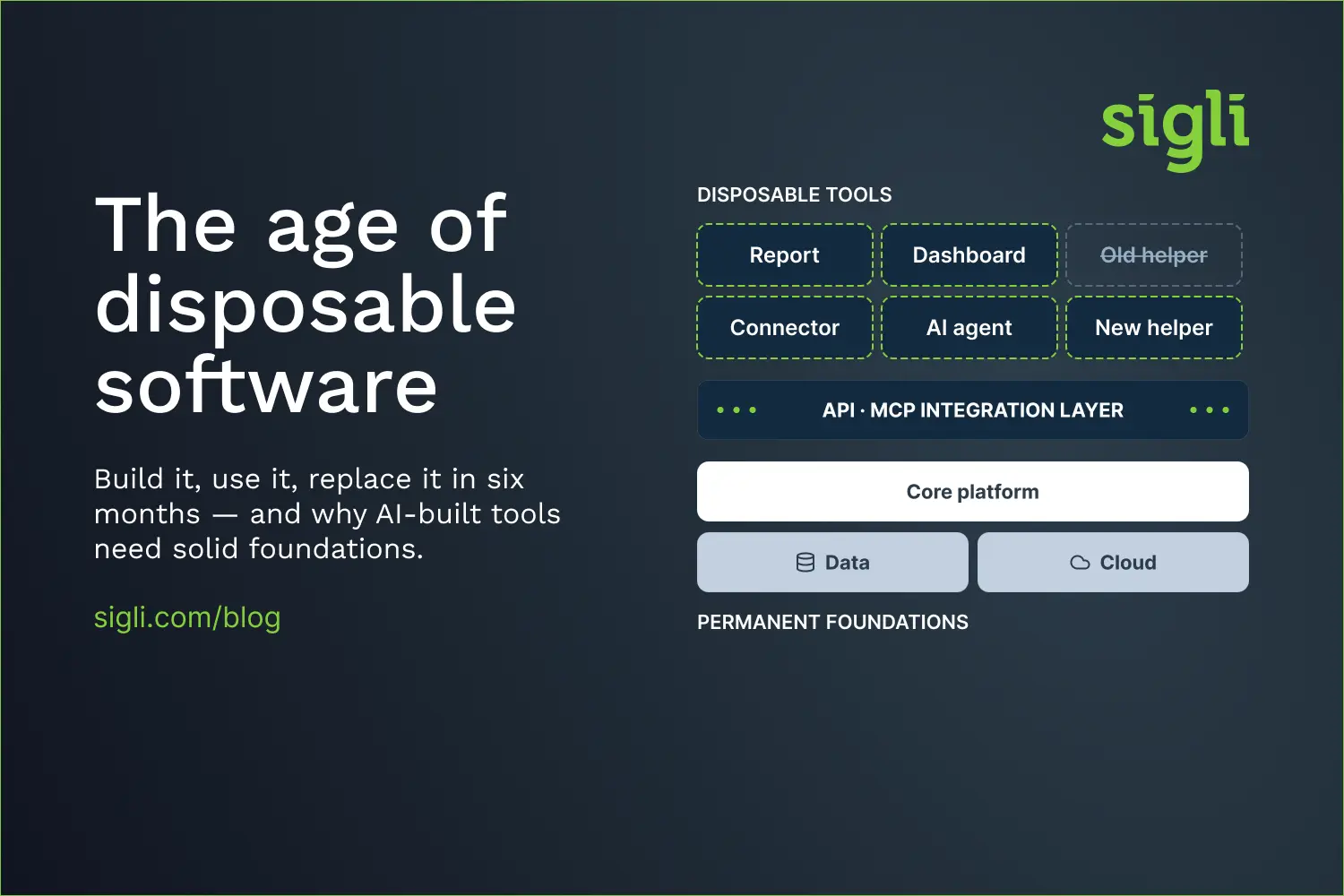
"Foundation" can sound vague, so here's a more precise picture. In a company where people build their own tools, software falls into three layers that change at very different speeds:
The top layer is meant to change quickly. The bottom two have to stay stable, so everything above them can change freely. If a core system changes its data format without warning, every tool built on it breaks at once. If there's no integration layer, every tool connects in its own fragile way.
The main idea of this article is simple. Speed at the top depends on stability underneath. The rest of the article explains what that stability takes.
This is also why AI won't replace software architects. AI makes the top layer cheap to build. The two layers underneath still need people who design them to last.
Most companies don't find out their foundation is weak until people start building on it. These are the most common warning signs:
If two or more of these sound familiar, give your team better foundations before you encourage them to build more tools.
For years, a good API was a bonus when choosing software. It was useful, but rarely the deciding factor, because only developers used it. That has changed. Every AI agent and self-built tool reaches your systems through some kind of integration point. A system without one is closed to the people trying to automate their work.
That leads to a simple buying rule: don't choose a tool or service you can't integrate with. A polished interface matters less than it used to, because a team can build its own interface in an afternoon. A reliable, documented way for machines to read and write data is much harder to replace.
What good integration looks like in practice:
An API is a way for one program to talk to another, and every API is designed differently. A developer has to read its documentation and write code for it. The Model Context Protocol (MCP) is an open standard built specifically for AI agents. An MCP server describes what a system can do in a common format, so any MCP-compatible agent can discover and use it without custom code. In practice, MCP servers often sit on top of existing APIs: the API does the work, and MCP makes it understandable to AI.
For older systems with no API, this usually doesn't mean replacing them. Legacy system modernization means updating older software so it meets today's needs, and it rarely requires a full rewrite. Often a thin modern layer in front of a legacy system is enough to make it usable by today's tools.
An API gets a tool into a system. Data quality decides whether what the tool finds there is any use.
This matters more with AI than it did before. A person reading a messy report notices that two numbers don't match and asks someone. An AI agent usually doesn't. It works confidently with whatever it receives. Duplicated customers, inconsistent product codes or outdated prices go straight into its output, and nobody may notice until a customer does.
A few things make data ready for self-built tools:
Tools can be thrown away. Data can't, because it's the one thing every version of every tool relies on.
When anyone can build a tool, you get a lot of tools, many of which IT never sees. This isn't new: it used to be called shadow IT. When the tools are AI chatbots, agents and automations, it's now called shadow AI: AI tools employees use or build without IT's knowledge or approval. What's new is the scale, and the fact that these tools can now act on their own, not just display information.
Banning self-built tools rarely works, and it gives up the productivity gain that makes them worthwhile. The better approach is to make the safe path the easy path:
Put these in the foundation once, and every tool built on top inherits them. You get the speed of disposable tools without the risk of disposable security.
To see where you stand, go through these questions for your three to five most important systems. Every "no" points to a foundation gap:
You don't need a "yes" everywhere before anyone builds anything. But the systems your team relies on most should get there first.
At Sigli, we don't see self-built tools as competition. Every routine task a client's team automates on its own frees time and budget for the work that really needs engineers: the foundation.
That's where we focus:
You bring the people who know your business. We make sure they have something solid to build on.
The shift to disposable tools is already happening, whether or not your company has a strategy for it. The real choice is whether those tools are built on solid ground or on spreadsheets, shared passwords and integrations nobody understands.
The companies that benefit most won't be the ones with the most AI tools. They'll be the ones whose core systems, integrations and data are ready for whatever their team builds next.
Want to know how ready your systems are? Book a foundation review with Sigli
Hear Ákos Maróy's full take on throwaway tools on the Innoadvantage podcast.
Yes. AI agents can now write, test and run small applications from a plain-language description, and many teams already use them for internal tools and automations. Larger, business-critical systems still need experienced engineers to design the architecture, check quality and keep them reliable over time.
An MCP integration connects a system to AI agents through the Model Context Protocol, an open standard. The system runs an MCP server that describes its data and actions in a common format, so any compatible AI agent can find and use them safely, without custom code for each agent.
A single source of truth is the one agreed place where a piece of data is created and maintained, such as customer records in the CRM. Every other system and tool reads from it, so everyone works with the same, consistent information.
A system of record is the authoritative system for a specific type of data, for example billing data in the ERP. A single source of truth is the broader practice of making sure everyone uses consistent data. It often brings together several systems of record in one shared data layer.
The main risks are company data leaking to external AI services, tools with more access than they need, gaps in GDPR and industry compliance, and automations that keep running after their creator has left. Clear access rules and a simple register of tools reduce these risks without banning AI.
Give each tool or agent its own credentials, never a shared or personal login. Start with read-only access, add rights only when a specific task requires them, log every action that changes data, and review permissions regularly so unused access is removed.
System integration services connect separate software systems, such as ERP, CRM, billing and data platforms, so they share data and work together. Today this increasingly includes building APIs and MCP endpoints so that AI agents and self-built tools can use those systems safely.